How to Use the Zoom-Effect Underwater
How to Use the Zoom-Effect Underwater
Add some Speed and Action to your Images with a Creative Zoom-Effect
By Lill Haugen
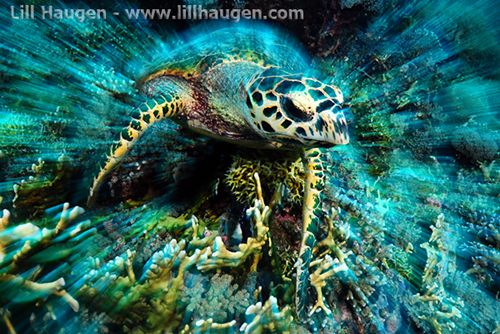
Shooting underwater should certainly not be an obstacle in trying creative photographic techniques, since most of them will work just as well in the water as on dry land. Playing around with shutter speed, zooming and camera movement can reward you with interesting and unique underwater images.
”Zoom-effects" in underwater photos can easily be made with Photoshop-filters, but most agree that using these is cheating. Why not get it right in the camera as you’re shooting the image? This article shows how to master zooming shots.
It’s Not That Difficult
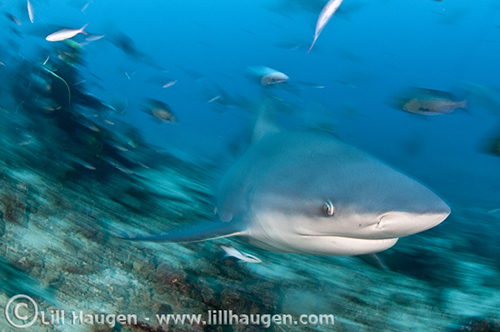
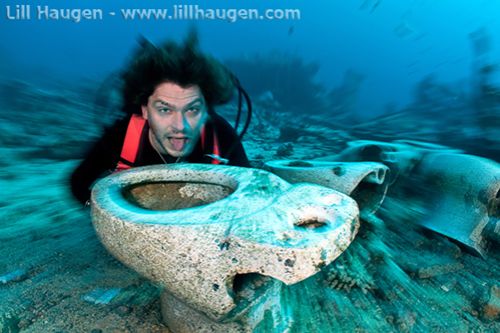
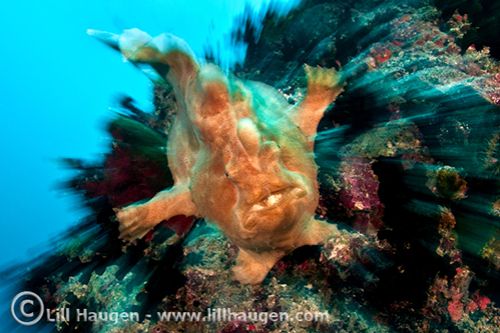
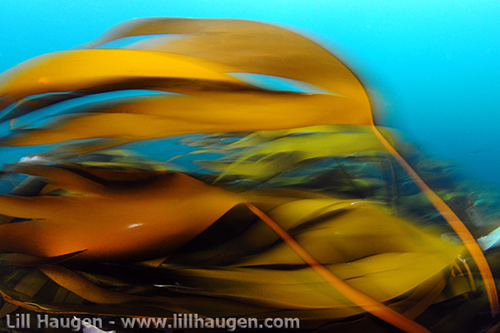
The main thing is to slow down your shutter speed – like you would do when shooting deep wrecks in poorly lighted conditions. Only now you go a bit further! The zoom-effect is similar to the “panning effect”, but uses the lens zoom and slow shutter speed to create motion, instead of a sideways camera movement. This technique will create a blurry background/motion effect in your picture but at the same time, when successfully executed, leave your main subject nice and sharp. Strobe light is what freezes the main subject. There are many different creative slow shutter speed shots, including moving with the subject, moving the opposite direction and pivoting the camera. The zoom shot is just one of many exciting options.

The Technique
First of all you, need a lens that allows you to zoom (like the Tokina 10-17mm or Nikon 12-24mm fisheye) and an underwater housing/port that allows you to zoom manually. Next, you need to manually set a slow shutter speed on your camera. It must be slow, but still within the range where you can hold your camera fairly still. 1/20 to 1/6 seems to work well, but really depends on the photographer, subject and diving conditions.
Sufficient strobe light increases the chance of success and brings some color back into the image. This is because your strobes fire fast enough to freeze fast motion (moving subject, panning, zooming, etc). In shallow reefs with plenty of light you will need to stop down your aperture to F11-F16, as the water may be too bright with a slow shutter speed. Then, you will need to put your strobes on “full” to be able to light your subject. Also, it is a good idea to set your camera flash to “rear curtain sync”. This fires the strobe at the end of the exposure, meaning that blurry streaks will be behind your subject, showing forward movement. If the strobe froze the motion at the beginning of the exposure, the subject would look to be moving backwards, which is unnatural.
Ready to try it out? Find your desired subject and zoom all the way in. Next, zoom OUT in one smooth motion as you simultaneously push down the shutter while also holding the camera as still as possible.
Shooting Tips
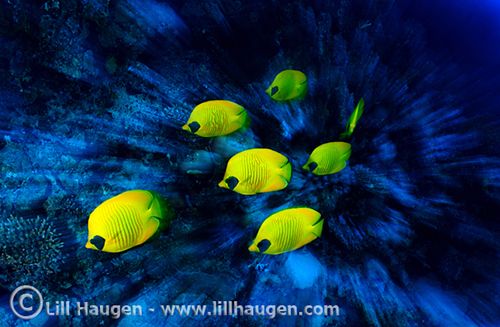
Creating a good zoom-effect is harder to achieve if your background is clean, like open blue water. The opposite (a “messy” reef) is more suitable to create pronounced zoom stripes and separate your subject from the background.
One last tip – don’t go out and zoom on everything you see! Effects like this have the most impact if used sparingly and at the right moment. To get a great photo, you STILL need good composition and you STILL need to tell a story. Use the zoom-effect to enhance your image rather than having the effect carry your photo. Good luck!
About the Author
 Lill Haugen is a Norwegian underwater photographer based in Oslo. Lill shares glimpses of the underwater world in a variety of magazines and publications worldwide. Despite regularly visiting prime dive destinations all over the world, most of her diving is done in the cold fjords of Norway. She is twice Norwegian Champion in underwater photography (2010, 2011), awarded in Nordic and international competitions including the CMAS World Championship 2011, Ocean Art 2011, Deep Indonesia 2012. Lill is passionately involved in the conservation of our oceans, especially shark conservation, through telling tales from the underwater world and showing its beauty, while also raising awareness of the huge environmental challenges of the oceans: overfishing, destruction of habitat, pollution and climate changes. www.lillhaugen.com
Further Reading
-
Guide to Creative Shooting Underwater
-
Using Slow Shutter Speeds Underwater
-
Over-Under & Split-Shot Photography
Where to Buy
Please support the Underwater Photography Guide by purchasing your underwater photography gear through our sister site, Bluewater Photo & Video. Click, or call them at (310) 633-5052 for expert advice!