Underwater Snoots

Scott Gietler and Bill Van Antwerp

Underwater Snoots 101

Another way to approach your underwater photography

By Scott Gietler with input from Bill Van Antwerp


SHARE THIS STORY

Snoots are commonly used in studio photography to control beams of light from a strobe or flash and narrow it to create a "spotlight" affect, or when you want to selectively light just a small portion of a scene.


The strobist says, "sometimes what makes a photo sing is not so much where the light is, but where it isn't." And that is the essence of a snoot.

In this article we document some of our first attempts using a snoot, and share some of our experiences.

seahorn snoot setup

Snoot with full macro attachments, placed over my port. The snoot is on my Inon Z240 strobe.


Snooting with a macro lens - first attempt

Instead of using a camera and an off-camera strobe, I decided to leave the strobes on my arms. I turned off the left strobe, and placed a snoot on my right strobe. For different shots I moved the strobe around, so sometimes the light was coming from the right, and other times it was directly overhead.

The Seahorn snoot I used did not really fit my Inon Z240 very well, so I had to hold the camera with one hand, and hold the snoot and strobe together with my right hand. It sounds difficult, but after 10 minutes on my first dive with my snoot I was able to take the following two photos, which I quite like.

Subject selection is key, and I was lucky to see a scorpionfish in just the right spot immediately after descending on the dive. Visibility was very poor, 10-15ft with particles, and I was happy to find out that using the snoot greatly cut back on the backscatter in my photos.

snooted fish underwater photo

Scorpionfish lit by snoot. Nikon 60mm lens, small dome port. F11, 1/320th


underwater snoot photo - anemone

Underwater snoot photo of a Corynactis anemone. Although the snoot effect is subtle, for this subject it creates a beautiful portrait of the anemones that has much better lighting than using a regular strobe. F11, 1/320th


underwater snoot photography

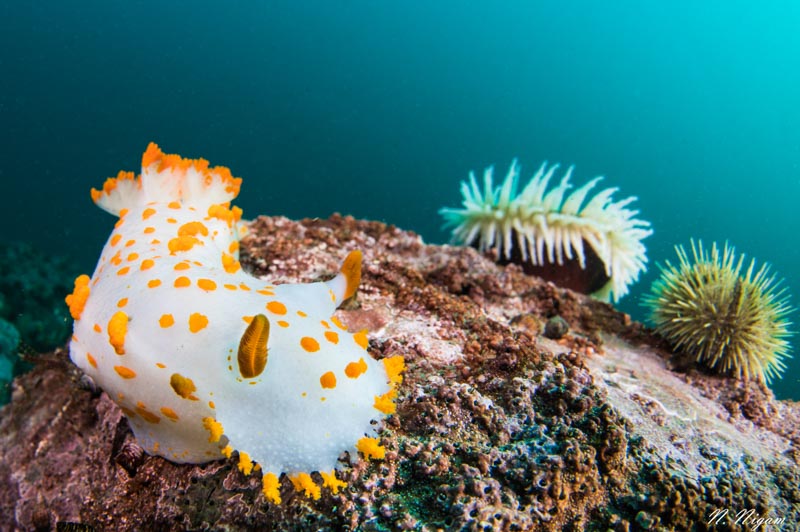
Spanish shawl nudibranch, taken with snoot. 60mm lens, flat port. F11, 1/320th


Strobes and spotting lights

Using a strobe with a spotting light, also known as an aiming light, was essential for using a snoot on a strobe still attached to my camera. The aiming light does not land directly where the snoot light will land, but your mind soon learns how to calibrate between the two. When using a tripod with macro subjects, having a spotting light on the strobe is less important because your snoot will often be very close to the subject.


Snooting with a wide-angle lens

I experimented with some wide-angle shots with ambient light exposures. Looking back, I really wish I had 2 snoots on tripods so that I could fully light up the round object in the foreground of the first photo. Still, I think this photo demonstrates the possibilities when to selectively colorize and light up a wide-angle photo.

underwater snoot photography wide-angle

Underwater snoot photography with a Tokina 10-17mm fisheye wide-angle lens. F9, 1/100th, ISO 320


snooted fish underwater photo

A snoot on my right side was used to light up the area in front of the scorpionfish. A fill flash was used on the left side for a little rim lighting. A snoot in a wide-angle photo can give the impression of a subject coming out onto a stage.


underwater snoot photography

You can't tell from the photo, but this sheep crab was moving quite fast. I was lucky to get the light right on him. This photo would never have worked with a tripod. I tried for a vertical composition with more kelp in the background but I couldn't get one that worked,and I didn't want to overly harass the subject. F10, 1/50th, ISO 320.


Snooting with a tripod

When lighting up selected areas of a macro subject, you can no longer hand-hold the snoot, you should use a tripod. Bill Van Antwerp went to Bonaire and used a Joby gorilla tripod. Make sure the tripod is weighted, and try to find an area that has no surge. The snoot should be well fitted on the strobe, the slightest movement of the snoot will throw off the lighting.

In these examples, no spotting light was used. The end of the snoot was very close to the subject. Large amounts of patience was used.

pikeblenny from bonaire, snoot photo

Pikeblenny from diving Bonaire, photo by Bill Van Antwerp. Both of Bill's photos are with a Canon 7D, Canon 100mm macro lens, Subsee +5 diopter. F14, 1/160th


arrow crab from Bonaire, taken with snoot

Arrow crab from Bonaire, photo by Bill Van Antwerp


I hope this article gives you an idea of what is possible in just a short amount of time with a snoot. With some planning and dedication, you should be able to take much better photographs than the ones in this article.

Feel free to ask questions or post your own snoot photos in our underwater snoot thread.


Further Reading


Support the Underwater Photography Guide

Please support the Underwater Photography Guide by purchasing your underwater photography gear through our sister site, Bluewater Photo & Video. Click, or call them at (310) 633-5052 for expert advice!


Stories from a Underwater photo workshop

Paul Colley
Taking Dedicated Underwater Photography Workshop with Alex Mustard and Martin Edge

The Value of Dedicated Underwater Photography Instruction and Workshops

Learning Underwater Photography from Alex Mustard and Martin Edge

By Paul Colley 


In common with many people, I have always been attracted to images from the underwater world and soon after learning to dive, I aspired to produce my own. In 2006, I bought my first underwater camera, which was a simple compact with a single strobe. My first underwater images still serve to remind of a fantastic holiday. However, compared with the stunning pictures that adorned the pages of my favourite coffee table books and web sites, they looked poor. So I embarked on a modest investment in my skills.

I began by absorbing everything that I could from books and web sites (and the Underwater Photography Guide is superb – well done, Scott), but my real break through was taking one day of personal tuition with a renowned UK underwater photographer and then a week-long dedicated underwater photographic workshop with another. You will be your own judge, but the experience took me from rank amateur producing pictures devoid of colour and interest, to a much more confident photographer who has even achieved a small portfolio of competition-winning images. It leaves me convinced that dedicated instruction and workshops are the best way to advance skills quickly. I highlight just a couple of images below, which for me have encapsulated the value of professional instruction, because the pictures are now being recognised by fellow photographers (something that I had not achieved before).


How I took the underwater photo - Stingray image

The first image is of a Southern Stingray. Photographers the world over have taken millions of images of the sociable Stingrays that swim to the North of Grand Cayman in only a few metres of water. This particular shot was taken just after dawn using natural light and a red filter, but it is most attractive for me due to the wonderful blues and the frozen upbeat of the Ray’s nearside wing, which reveals the Remora hitching a ride underneath. The dominant feature is the natural light, which brings out beautiful surface and sand patterns, both of which provide in turn a strong frame for the main subject. This image was placed 13th in the overseas category of the 2010 British Underwater Image Festival annual print competition and 1st in the March 2010 Nature’s Best Photography weekly international competition.

stingray underwater photo in cayman islands


Dawn Stingray, Grand Cayman. Nikon D300, Tokina 10-17mm fisheye, natural light with Magic red filter. F10 at 1/50 sec, ISO 200.


How I took the underwater photo - Snapper Hole

The second image is of a diver in a famous Grand Cayman swim-through at Snapper Hole, using an off-camera lighting technique. Alex helped his students to set this shot up by providing a remote strobe to illuminate the diver inside the cave, which was triggered by lighting from one of the on-camera strobes aimed at a slave sensor. For me, the shot is defined by the exposure technique, which brings out the strong blue background. This needed a medium f-stop and a correspondingly slow shutter speed.

The composition is also important. Alex was keen that the student photographers included the small patch of blue at the top right hand corner, which adds balance and an implied strong diagonal to a very pleasing overall composition. The under-exposed inside of the cave also provides very strong contrast for the rest of the picture. This image came 3rd in a May 2010 British Society of Underwater Photographers competition and it also won a UK newspaper Daily Telegraph weekly photographic competition on the theme of solitude.


dive at snapper hole, underwater photography workshop


Diver at Snapper Hole, Grand Cayman. Nikon D300, Subal housing, Tokina 10-17mm fisheye lens, INON Z240 triggering off-camera strobe. F8 at 1/20 sec, ISO 200.


The value of a good underwater photography workshop

I hope that you enjoy these images as much as I have. But the real point of this article is to emphasize the importance to amateurs of good instruction. To that extent, I take my hat off to both of my instructors, who have, in the space of 1 day and one week respectively, helped me to take my photography to a far more pleasing standard.

The journey started when my wife suggested that I should take a day’s tuition with one of the UK’s top underwater photographers, Martin Edge. In July 2008, Martin taught me to look at the underwater world in a different way. He set me on the right track to thinking about composition and many other vital aspects of underwater photography.

The standard of the images that I began to produce after only one day was much higher than hitherto. With a busy full time job and only a few opportunities to dive each year, I soon worked out that the more effort that I put into thinking about photography, the more that I would get from my few opportunities to exploit it. Yet as vital as theory is, there is only so much that you can learn from books. If you want to improve quickly, instruction, dedicated coaching and constant practice are the best remedies for only average ability (like most divers, I am only an average photographer). I do practice photography top side, because that provides frequent opportunities to grip the technical aspects. But my progress underwater stagnated and, to build on the jump-start that Martin had provided for me, I joined one of Alex Mustard’s week-long photographic workshops in the Cayman Islands at the beginning of this year. Many people reading this will also know Alex who, like Martin, is a thoughtful and highly competent instructor. I simply cannot overstate the value of such workshops and thought that it would be useful to capture the essence of this particular one, which led to the two images above.

Alex’s workshop was dedicated to close focus wide angle underwater photography. However, there were ample opportunities for macro photography as well. His workshop began with a dedicated pool session to fine tune the correct placement of strobes. Valuable early lectures improved student understanding of how to capture and control light underwater. Alex encourages photographers to master the technical side in order that they can then concentrate harder on memorable shots; there is nothing more distracting to artistic thinking than paying too much attention to technicalities whilst underwater. One of the most valuable aspects of the workshop for me was an evening image review session, at which Alex and other photographers constructively critique your images.

So, if like me you struggle to produce great images and have only limited time to invest underwater, consider taking some dedicated instruction. There are plenty of superb instructors out there. I am not setting out to advertise anyone in particular, and neither instructor mentioned here even knows that I have penned this article. Instead, I simply make the general point from my own experience that a modest investment at the start of your interest in underwater photography can pay handsomely in the satisfaction that you subsequently achieve from the quality of your images. Happy shooting to you all.

Paul Colley

paul colley underwater photographer


Paul Colley is a full-time director of a UK think tank, but takes every opportunity in his spare time to pursue a passion for diving and underwater photography. He hopes to take up underwater photography full time on retirement. You can see more of his work at mpcolley.com

You can also read more about Martin Edge’s workshops and Alex Mustard's workshops. The Underwater Photography Guide also gives workshops in California. 

Editors note: You can also see Paul Colley's work in our article on Saving Bluefin Tuna


Slow Shutter Speeds in Underwater Photography

Stanley Bysshe

Slow Shutter Underwater Techniques

Slow Shutter Speeds in Underwater Photography

By Stanley Bysshe


SHARE THIS STORY

A while ago, the Guide to creative Shooting Underwater, a great tutorial by the way, was published. But we all have to admit that at times our photography gets a little stale or we are on a dive and just don't seem to be inspired by what we see. That might be the time to use our cameras to their fullest potential and try some creative shots. (Actually I never know if they are "creative" until I see them in post processing!)


Shutter drag, slow shutter speeds, slow shutter synch and rear curtain synch are all terms that apply to slowing the action of your subject down to obtain a sense of motion. The effect is to have a blurred background and sometimes a partially blurred subject. But the results are quite unpredictable which make the technique a great way to challenge your photographic skills. Even with the new large LCD screens you will be surprised with your images only when you down load and review them on your computer. A teacher and friend, Mauricio Handler got me to rethink about slowing down.

Slow shutter speed usually applies to a setting of 1/60th or longer. Most of the time you will be working with a shutter speed of 1/5th to 1/8th of a second. As you will be working with flash for the most part, "slow shutter synch" and "rear curtain synch"  (RCS) apply to when the flash fires relative to when the shutter opens and closes. Setting the former allows the flash to fire just at the opening of the shutter, while using RCS dictates the flash to fire just before the curtain closes. This of coarse only effects the image for very long shutter speeds. (Open, flash...........close vs. Open.............flash, close.) Nikon and certain Canon models have different terminology so you need to go to the manual and know how to find the settings when the camera is in the housing. TTL converters usually have to be off and for the most part the camera and flash will be fully manual (Aperture priority can be used as outlined in the above review). The newer compacts have shutter speeds down to 1 sec. but I am not sure about RCS. I know the G11 has a Slow Synch.

Shutter drag is an old timers phrase for panning or drawing the camera with or against the moving subject, again, with slow shutter speeds, resulting in a blurred background.

Underwater Photography Tips for Slow-shutter photography:

Underwater Subjects:

Start with stationary subjects that are moving with the surge or current; feather dusters, cluster dusters, anemones (best with color at the tips). Then try medium sized moving fish that you can get fairly close to so you can focus on the eye and move with them or pan the motion. Try a stationary fish/colorful crab and supply the motion by twirling your camera or zooming the lens during the long shutter speed. Look for lots of color in your subject.


Lighting tips:

Bright days (especially in the tropics) are tough because you have to use small f stops in order to avoid over exposing the image (especially the background which will have lots of ambient light). This also means the flash will have a hard time lighting the subject unless you are really close. Shoot on cloudy days, or try shooting when you are at the deeper part of your dive. Plan a late afternoon dive. Take the diffusers of the flash to help light the subject when a really small f stop is needed. If you are shooting a macro subject, ambient light might be less of a problem.


Lenses:

Start with a medium macro lens, my favorite is the Nikon 60 mm 2.8 micro. A mid-range zoom or wide angle (if you get really close) will work as well. Experiment with any of your underwater lenses.


Camera:

Know your settings. Getting to RCS on my Aquatica housing requires both hands while swimming upside down. I like Rear Curtain Synch because the flash will help freeze the subject at the last moment. Take lots of shots and try to keep track of what you did so along with your metadata you can repeat your successes next time out.


Getting started - camera settings:

RAW files, Center weighted metering, WB at cloudy or Auto, ISO 100 or the slowest you can get, manual camera and flash, slow synch or RCS with the flash, shutter speed of 1/5-1/8 which may mean f stops of 22-36 unless the ambient light is low.

Position flash(s) to light the subject and check your LCD often to be sure you are not overexposed.

The fun begins when you down load the images because the effects can be quite unexpected. If you are doing a lot of photography on your next trip save a few dives to shoot slow shutter speeds and post your shots.


All images are with a Nikon D2x in an Aquatica housing with dual Inon Z220 flashes. ISO 100, Center weighted, WB cloudy and adjusted in RAW. Aperture 2 for some sharpening, contrast and vibrancy. A few images were also cropped.


135-Cluster-Duster.jpg

Image #1 Feather Duster worms. A stationary subject where motion is supplied by the current. Shutter Speed 1/10th, f22 Nikon 105 mm 2.8 micro VR


2-Shrimp-and-Anemone.jpg

Image #2 Spotted Cleaner shrimp in Pink-tip Anemone. Motion softens the image.
1/8th, f 36 -.3Ev Nikon 60 mm 2.8 micro


3-90-Banded-Coral-Shrimp.jpg

Image #3 Banded Coral Shrimp on Eel. Shutter speed 1/8th, F32 Side lighting. Nikon 105 mm 2.8 micro VR


4-91-Scorpion.jpg

Image #4 Scorpion fish. Camera twist adds the motion. SS 1/8th, f 20 Nikon 105 mm 2.8 micro VR


5-196-Puddingwife.jpg

Image #5 Puddingwife Wrasse. A fast moving fish supplies all the motion. SS 1/10th, f36 Nikon 60 mm 2.8 micro


Four-Eye.jpg

Image #6 Four Eye butterfly swimming over sand. SS 1/6th, f 32 Nikon 60mm F2.8 micro


7-196-French.jpg

Image #7 Juvenile French Angel swimming over sand. SS 1/8th, f 36 -.3Ev Nikon 60mm F2.8 micro


8-175-Queen-Intermediate.jpg

Image #8 Intermediate Queen Angel patrolling its reef station. SS 1/8th, f36 Nikon 60mm 2.8 micro.


About the author


Now retired, I have tried to dedicate more time to becoming a better photographer. Certified more than 30 years ago, I have always been fascinated by coral reef ecology and creating underwater images. My wife and I moved to Curacao N.A. to start our retirement so working underwater has become almost a daily exercise. My first underwater camera was a Nikonos I, but the digital age certainly allows for a faster learning curve. My land photography also gravitates to the natural world and I hope to add some shots from our travels as well. To date I have not been very happy with scanned 35mm images so the folders of slides continue to gather dust!

You can also visit Stanley Bysshe's Photography Website.


Further reading

Creative Shooting Underwater

Setting Shutter speed underwater


Support the Underwater Photography Guide

Please support the Underwater Photography Guide by purchasing your underwater photography gear through our sister site, Bluewater Photo & Video. Click, or call them at (310) 633-5052 for expert advice!


Batteries and Chargers

Bill Van Antwerp

Batteries, Chargers and Testing for Underwater Photographers

The importance of choosing the right batteries and equipment in underwater photography

By Bill Van Antwerp. Part 1 of a two part series


SHARE THIS STORY

Let’s face it; today’s underwater photography is completely dependent on batteries of one sort or another. Your camera won’t run without batteries; most DSLRs and some point and shoot cameras use proprietary batteries while some P&S models can use AA batteries. Your strobes require batteries too, some use AA while many use a proprietary battery. Same thing for your focus lights and those of you shooting video have to lug around even bigger batteries for your video lights. This article is the first in a series that will talk about battery types, sizes, charging and testing batteries to make sure you don’t miss a dive because you don’t have any power.


Battery Types

There are many ways to characterize batteries but one simple one is by rechargeable vs. disposable. Most batteries that we tend to use as underwater photographers are rechargeable but many folks still use disposable, single use AA batteries in their devices. One reason for this is that the most common rechargeable battery the nickel metal hydride (NiMH) battery has a voltage that is a bit less than the voltage of a AA zinc/carbon battery. The NiMH battery has an operating voltage near 1.2 V while the standard Duracell or Energizer battery has an operating voltage closer to 1.5 V. The second reason that disposable batteries are commonly used is that they have a very long shelf life.


Typically an alkaline battery loses only 2% of its capacity in a year on the shelf, compared to most rechargeable batteries that can lose 20% of their capacity in a week and 10% per month after that. Unless the voltage or shelf life is critical; we recommend using rechargeable batteries to save money and reduce the environmental impact of disposing of so many batteries. One very recent attempt to increase the shelf life of rechargeable batteries is to reduce the internal discharge rate. The first of these were the Sanyo Eneloop batteries and now there are many other brands of low internal discharge AA batteries.


Choosing a charger

Chargers come also in a variety of flavors. There are chargers that claim to charge batteries in as little as 15 minutes and others that might take 2 hours or more. Faster is not always better since batteries can be ruined if they are overcharged or overheated. In general it is recommended by the battery makers to charge their batteries at a rate that is 50% of the capacity of the battery. For example, a 2500 mAh (milli ampere hour) battery should be charged at a rate of no more than 1250 mA or 1.25A. This means that the type of charger you use can make a difference.

There are several smart chargers that are on the marketplace. Two very nice ones are made by Powerex and by La Crosse. Both of these chargers can set individual battery charging rates, as well as discharge rates and can condition the batteries by controlled charging and discharging.


Powerex Charger

Maha Powerex MC-9000, a reliable product


Powerex Charger

La Crosse BC-900, a great performer


Powerex Models MH-C9000 and BC-900

Powerex Models MH-C9000 and BC-900


The La Crosse version has almost exactly the same functions but is quite a bit smaller. Both are excellent chargers and will keep your batteries working well for a long time.


Chargers to avoid

Avoid the 15 minute chargers, they have a chance to kill your batteries and invest in one of the smart chargers. For trips, both the Powerex and La Crosse are quite large; we take the smaller MAHA chargers that charge AA batteries in pairs at a fixed 500 mA per battery. These take an hour or more to fully charge 4 AA batteries that are depleted but they appear to be indestructible and work (so far) everywhere in the world at all voltages, frequencies and are immune to interruptions when a liveaboard changes generators.

Battery care

Taking care of your batteries is important. Salt water is obviously a no-no but there are other dangers. Heating them up to fast is deleterious as is freezing them then warming them rapidly. Most important, dropping batteries on a hard floor like on a boat can drastically alter their life.

NEXT TIME: Bigger is better when it comes to batteries, right? Not Always. Find out why in Part 2: Best batteries for your strobes.
 

About the author

Bill Van Antwerp shoots underwater as well as topside photos. He is currently shooting a Canon 50D in a modified Subal housing. He uses a variety of strobes with his favorite being the Inon ring flash for macro photography. His website is www.blueviews.net


Further Reading

Part II: Batteries put to the test

Sync cords, fiber optic cords, arms, clamps, viewfinders

dSLR Underwater Equipment checklist


Wide-Angle Strobe Exposures

Todd Winner
Setting the correct strobe exposure when shooting wide-angle

Strobe Exposures in Underwater Photography

Shooter's Toolbox Vol. 2

By Todd Winner


SHARE THIS STORY

In Vol. 1 we talked about the basics of ambient light photography, as the first step in mastering wide-angle underwater photography. We discussed how we let light into the camera body with our shutter speed and aperture controls, and how we use our ISO control to set how sensitive the camera's sensor is to light. Basically your cameras main function is to keep light out, and you as a photographer have the job of letting light in using those three controls.


Bicycle at Truk Lagoon, Nikon D2X, Tokina 10-17mm fisheye lens @10mm 1/125 f/11 ISO 100, strobe exposure only, 2 strobes, manual strobe power.


Adding artificial light, typically one strobe or multiple strobes, can give you much more creative control over your images, filling in shadows and adding back color that has been absorbed by the water. When we combine both ambient and strobe light together we have a balanced light image. This is how the majority of wide angle underwater images are produced. But before we start with balanced light photography lets work on strobe lit only images.

Many of you may already be shooting images using only strobe light. Most macro images are just that, but we also need to be able to light wide angle images with just our strobes. There are times when no other light source is available such as in a cave or a shipwreck. When you learn what can and can't be lit properly with your strobes, you will have a much better understanding when it comes to balancing different light sources.


Strobe Exposure


 Airplane engine at Truk, Nkon D2X 10-17@12mm 1/200 f/8.0 ISO 100


Camera and Strobe Controls Underwater:

So what camera controls are available to us when we are lighting with just our strobes? Well we learned there are only three in vol. 1. Your ISO and aperture controls work exactly the same way but our shutter speed has no effect on our strobe exposure. That is because our strobes go off in a nano second! Actually I have no idea how fast a nano second is but like our strobes, it's fast. Our strobes turn on and turn off much faster than the fastest sync speed. In addition to the two camera controls we also have multiple power settings on most strobes and one other item that is not really a control at all, distance. A strobe can only expose one particular distance correctly at a time. In other words if you take a perfectly lit image and take the same image a foot closer without changing any other settings it will be over-exposed. Move further away and it will be under-exposed. The same is true for subject distance. If you are trying to light a sea fan with a diver next to it, the diver needs to be the same distance from the camera as the fan. If the diver is a few feet behind the fan, the diver will be under- exposed. It's true that different subjects will reflect light differently but this should give you the basic concept. So let's recap: we have ISO, aperture, strobe power, and distance to worry about. Only 4 controls, that shouldn't be too hard!

 To review - we have 4 controls to worry about:

  • Aperture
  • Strobe Power
  • ISO
  • Distance from our strobe to the subject


Underwater Photograpgy Strobe Exposures


 Inside a Cave while diving Palau, Nikon N90 / film. The other diver is holding a slave strobe that my strobes set off. We had pre-arranged this before hand.


To TTL or not to TTL, that is the question:

In the days of film there was a sensor that calculated how much light was being reflected off the film itself. When the sensor received enough light it would shut off your strobe before it completed a full power dump. Most digital cameras calculate TTL in a different way often using pre flashes but the results are essentially the same. TTL works well in many normal lighting situations. But for many dramatic and balanced lighting situations, I would suggest using manual strobe settings. You can further tweak your TTL settings by adjusting the flash compensation control on your camera. Some strobe manufactures have TTL converters with compensation controls on them like the ones from Sea-n-Sea or the ones ikelite installs in their housings. Learning to shoot with manual strobe settings can only help you with your TTL shooting in the future. You will have a better understanding of what is and what is not possible.


Wide Angle Underwater

Compressor, known as "R2D2" Nikon D2X, Tokina 10-17@13mm 1/125 f/4.0 ISO 100


Shooting Manual Strobes:

Using a hand held flash meter is great in a studio but not very practical underwater. So how do we decide on an f-stop, power setting and distance combination? We guesstimate. We used to use guide numbers back in the days when we used film and shot the same ISO all the time. Back then most strobes only had a few power settings. The guide number was provided by the manufacturer and represented how powerful the strobe output would be. The problem was not all guide numbers were created equal so many people set up test to come up with their own. Once you had a guide number you could divide that number by either the f-stop or the distance and get the corresponding figure. For example if I had a strobe with a guide number of 40 at ISO 100 and I was 5 feet away from my subject, I should shoot at f8. 40/5=8 The problem is that a guide number is for a given ISO and power setting. With multiple power settings and the ability to change ISO between shots, guide numbers just are not practical any more. It's much easier to get familiar with your strobe's power settings and check your LCD screen or histogram for exposure.


Strobe Exposure Exercise:

Here's a useful exercise that will help you get familiar with your strobe and camera settings:

Set up for wide angle photograpy, and set your ISO to 100 or 200. Set your shutter speed at the fastest sync speed (probably 1/250th on most dSLRs). Set your strobe on ½ power. I would start with one strobe and add a second when your comfortable with your results. Set your f-stop to f/8. Go down and find a nice big non-swimming subject like a sea fan. Start at about 3 to 4 feet away move forward or back until you get the perfect exposure. Once you do, go to the lowest and highest power settings and repeat the process. Then repeat the entire process at different f-stops. If you spend a couple of dives on this, you will be very familiar with your camera and strobe settings.


Underwater Exposure


 Truck, lying in deep water, well below 100ft.. Tokina 10-17@12mm 1/160 f/4.5 ISO 100


Aiming your Strobes:

There are a number of creative techniques such as backlighting, side-lighting, top-lighting, etc.


We will be covering those in later volumes of the “Shooters Toolbox”, but for now we are concerned about learning exposure, so we will start with forward edge lighting. The light comes out of our strobes in the shape of a cone. The exact shape and angle is going to depend on the brand and model. Most strobes suitable for wide angle have around a 90 degree or greater coverage. That's a pretty wide beam of light coming out of your strobe. It's been very popular to position the two strobes in the 10 and 2 position, aimed straight ahead or even slightly out. This technique works well in preventing backscatter but it often produces somewhat flat looking images. You need shadows to help create depth to your images. That being said, this is probably a good place to start when working on just exposure. Just know that when your shooting very close to your subject you will need to move the strobes in closer to the camera. As you back away from your subject you can spread your strobes out a bit.


Diffusers, Snoots and Gels:

There are a number of items that we can add to the front of our strobes. The most popular being diffusers. Just as the name implies they diffuse the light, spreading it out to a wider beam and softening the light creating less shadows. They also typically reduce the power by up to a full stop. Snoots do just the opposite. They narrow the beam and produce a very direct point of light. The exact shape and size of the light will very on the design of your snoot. Gels are used to change the color temperature of your strobes or for special effects. They also will cut the power output of your strobes.


Strobe Underwater Photography

 Skull deep inside a wreck, 10-17@10mm 1/160 f/8.0 ISO 100. This skull was on the ceiling.


Coming soon in the next article: 

In the third volume of “Shooters Toolbox”, we will be combining the techniques we talked about in both ambient and strobe lit photography. We will be creating balanced lit images and you should have a good understanding of basic lighting techniques. With that small set of skills you can go out and shoot just about anything. It works for macro, wide angle and everything in between. It's the basic knowledge you need to move on to other creative underwater photography techniques such as splits, motion blurs, and creative lighting. We will be covering those techniques and more in upcoming volumes. Feel free to contact me if there is anything in particular you would like covered.


Continue to part III: Balanced Light Exposures


About the author

This is the second of a series of monthly articles by Todd Winner on underwater photography technique. Todd Winner is well-know for his amazing wide-angle underwater photography, and his new book, the Shipwrecks of Truk. He can be contacted at www.toddwinner.com or winnerphotography@me.com


Further Reading

Shooter's Toolbox Volume 1, Ambient light underwater photography,

By Todd Winner

Discuss this article in the underwater photography forums

Canon S90/S95/S100 G11/G12 Settings

Canon S90/ S95, Canon S100, Canon G11/ G12 Underwater Settings

Settings for these popular cameras, and also the Canon S110 and Canon G15

By Scott Gietler


SHARE THIS STORY

Recently I taught an underwater photography class where I was able to use a Canon S90 and a Canon G11 underwater for some time. Afterwards I did quite a few dives using Recsea & Ikelite Canon S95 housings, with Ikelite & Dyron macro & UWL-04 wide-angle lenses.


Here my recommended Canon S90 , Canon S95, Canon S100, Canon S110 and Canon G10 / G11 / G12 / G15 underwater settings, if you are using an external strobe or flash:


Canon S90/ S95 / S100, Canon G11/ G12 settings for Macro

  • Manual mode, F6.3, 1/500th, ISO 100; 
  • Zoom in half-way
  • Macro mode, auto white balance, flash on forced flash mode
  • Turn internal flash to it's lowest power setting
  • Strobe on manual power; adjust strobe power as needed
  • These cameras also have a great focus check feature

Further reading: Taking great underwater macro with a Canon G12


When using a diopter like the Dyron 67mm or Subsee macro lens

  • Zoom all the way in
  • Shoot at F8 for maximum depth of field
  • Keep macro mode on
  • Use a good focus light to help the camera focus


Canon S90/ S95 / S100, Canon G11/ G12 settings for wide-angle & fish

  • Manual mode, F6.3, 1/125th, ISO 100
  • Zoom out
  • ** Adjust shutter speed as needed to control background exposure
  • Auto white balance, flash on forced flash mode
  • Strobe on manual power; adjust strobe power as needed
  • Turn internal flash to it's lowest power setting
  • If you are using a fisheye lens or dome port, turn macro mode on


If you don't have an external strobe / flash

You are shooting with the internal flash. In manual mode, the camera won't set the exposure of the flash automatically, you'll have to set the flash power yourself, which is no fun. To get that capability, which is basically TTL with the internal flash, use Av Mode, F5.6. In bright conditions, use Av Mode, F8.


Shooting the Canon S90, S95 or S100 in RAW mode

I like shooting RAW, and I definitely recommend it especially when shooting ambient light photos underwater (flash off) with a Canon compact camera.


The Canon S90 lens has some severe barrel distortion when shot at it's widest setting. This is automatically correct in the LCD, jpeg files, and Raw files when using Canon's DPP program.


However, you'll see the barrel distortion if you open up a Canon RAW file in another RAW editor like Adobe photoshop. There it must be correctly manually (Image / Filter / Distort / Lens Correction). If you own a Canon S90 here's some more great reading.


Canon S90/ S95 / S100 Battery advice

If you are using the Canon supplied batteries, the battery life indicator is not accurate. Always change batteries after 2 dives.


Advanced Settings

Our compact camera moderators posted some of their favorite underwater camera settings for the Canon S90/ S95 in this thread


Got questions about using the Canon S90, Canon S95, Canon S100, Canon G11 or Canon G12 underwater?

Post a question in our forums, in the compact camera corner, or call the Canon experts at our sister site Bluewater Photo & Video.


Further Reading


Support the Underwater Photography Guide

Please support the Underwater Photography Guide by purchasing your underwater photography gear through our sister site, Bluewater Photo & Video. Click, or call them at (310) 633-5052 for expert advice!


Strobe Positioning

Scott Gietler

Underwater Strobe Positions

Strobe positions for macro & wide-angle underwater photography

By Scott Gietler


SHARE THIS STORY

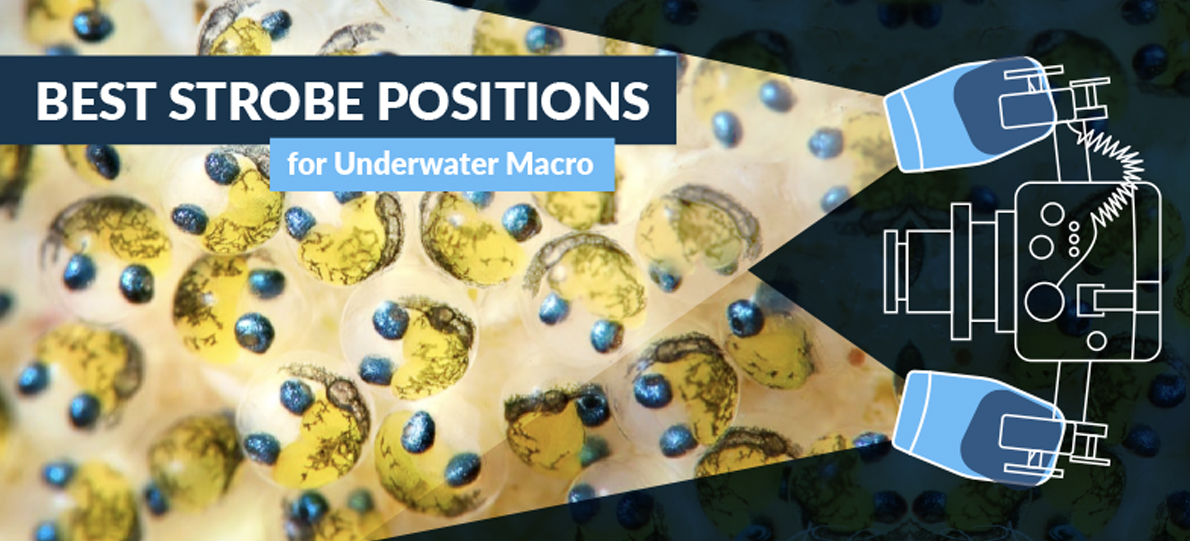
Some people are constantly changing their strobe positions. I fall into that category. I have other friends, excellent photographers, who never change their strobes, always leaving them in one position. There is no correct strobe position, it all depends on what you are trying to accomplish.


Here's some examples and tips of strobe positions that I have used. Since I'm never shooting in the clearest of water I'm always aware of the possibility of backscatter.


Looking for Todd Winner's article on shooting wide-angle with strobes? Click here


Quick Links

Strobe Positions for Macro       Strobe Positions for Wide Angle

Strobe Position with a single strobe

Strobe buying guide        Z240 review            Ys110 review

No more backscatter             No more hotspots      Diffusers

Gelling your strobes


Strobe arm length

The best solution is to use 2 strobe arms on each side. The arm connected to the housing should be 5-6 inches, and the arm connected to the strobe should be 8-9 inches long. This gives you maximum flexibility for macro, wide-angle, and CFWA underwater photography.


Strobe position diagrams for wide-angle

If you are using a single strobe, see the strobe diagrams here (registered users only).


Here's a position (photo above) for shooting with a 10mm fisheye lens. the strobes are pulled back and pointed outwards. However, if you are too close to your subject, you may get a dark area in the center. pull the strobes in closer (keeping them back and pointed out) to help alleviate this, or get a third strobe.


When using the Tokina 10-17mm fisheye lens, sometimes I close to the dome port at 17mm to photograph a subject. For this kind of photograph, it can be difficult to light the area directly in front of the dome port. I pull my strobes back even more, well behind the dome port, and I bring them in closer to the housing. The closer the subject is to the dome port, the closer I'll bring the strobes to the housing. See the photo above.


Strobe positions for Macro photography


underwater strobe position diagram

For fish photos I'll often put my strobes out to the sides, avoiding backscatter since the area in between the lens and the subject is not lit up. See the photo above. For fish that are very close, I'll have to move my strobes in closer.

fish underwater photography

Here's a fish that doesn't like to get too close.


underwater strobe position diagram

For macro, I'll often pull my strobes up and forward, pointing them slightly towards (but not directly at) the subject at an angle, giving a combination of side and front lighting. See the photo above.


Here's some photos lit with my standard macro position:


Sometimes I'll need to bring the strobes in tight, emphasizing front lighting more, especially if other positions are showing too many shadows. If needed, I'll bring them in even tighter, pointed forward in the direction of the lens, especially if a subject is in a crevice, inside a barrel sponge, or has nooks and crannies I need to light up. See the photo above.


I had to pull in the strobes tight to light the inside of this tunicate.


Here my strobes are brought way forward, emphasizing sidelighting and perhaps even a little backlighting, sometimes giving subjects a little glow. Experiment and think about where the light is going. See the photo above.


This Janolus nudibranch got a little bit of a glow beacuse I had my strobes pushed far in front, coming from slightly behind the nudibranch.


Here's a strobe position I use for direct, even front-lighting when shooting supermacro photography. See the photo above.


If I'm having trouble getting a black background, sometimes I'll switch to this strobe position, which is similar to the position described by kevin lee in the article below. Strobes are pointed at the port, minimizing the area lit up behind the subject. See the photo above.


Shooting Macro underwater with one strobe


If you have one strobe, you can successfully do macro photography by placing the strobe over the subject.


queen triggerfish

Queen triggerfish getting cleaned. Using one strobe gives this photo a unique look and a sense of depth. F8, 1/60th, Nikon 60mm lens, film camera. To me, it looks like the light came mainly from above. Photo by Uwe Schmolke.


Here’s an article on macro strobe positioning by Kevin Lee:


STROBE POSITIONING FOR MACRO PHOTOGRAPHY

Most underwater photographers are familiar with the tried-and-true principle of NOT aiming strobes directly at a subject, since the wide beam angle, which varies strobe to strobe, will illuminate the water column in front and behind the subject, resulting in unwanted, unsightly back-scatter.  Rather, non-direct aim is preferred. Turning strobes outward, so that the inside edge of the beam angle strikes the subject, greatly minimizes illumination of suspended particulates, between the lens and subject, thereby reducing back-scatter.

However, with macro photography, here is an alternate approach to consider for subjects within 12 inches or less of your lens. Try turning your strobes inward, in the extreme, so that the outside edge of the light cone, hits the subject.  That means strobes will actually be pointing at the housing.  Don't allow light to enter directly into the port i.e. always have the front of the strobe behind the plane of the port face; otherwise, the image can be badly burned or over-exposed (caveat, this method does not work well with wide angle lenses, as flaring results).  Since the subject to camera distance is so short, there is generally little risk of backscatter, unless one is shooting in pea soup. Also, decrease strobe power by 50% to achieve better image detail.  The goal is to gently kiss light off your subject for that ideal exposure.

This method is used with great success for highlighting a subject because, combined with a fast shutter speed (1/250 or faster) and small aperture (F18 or higher), cluttered, distracting backgrounds can be minimized.  In fact, if you shot at an angle, generally upward, with nothing but open water behind the subject, you can achieve a totally black background, which really makes the subject really "pop".  Such images exude a very "classy" feel and look.

Here are some examples of images taken with this technique.


Black dorid, copyright Kevin Lee


Kevin's strobe positioning


Further Reading

Instructional videos on strobe positioning

Great for people with only 1 strobe


Support the Underwater Photography Guide

Please support the Underwater Photography Guide by purchasing your underwater photography gear through our sister site, Bluewater Photo & Video. Click, or call them at (310) 633-5052 for expert advice!


Underwater Photography Tips

Scott Gietler

Underwater Photography Tips

Underwater Photography tips for Beginner and Advanced Photographers. Also visit our underwater video tips.

By Scott Gietler


SHARE THIS STORY

Includes Underwater Tips for the Sea & Sea DX-2G,Canon G10, G11 & G12, Canon S90, S95, S100,  Nikon d300, D7000, Nikon d90, Canon 7D, Olympus PEN, Sony NEX and all other Compacts / dSLRs.


Basic Underwater Photography Tips

These are the "traditional" underwater photography tips everyone should know


#1 - Get close to your subject - preferably within 12 inches. Water reduces color, contrast, and sharpness.

#2 - Make sure your camera flash is turned on, preferable in "forced flash mode."

#3 - For best composition - get low, shoot at an upwards angle, don't center the subject, try to fill your frame with the subject. Don't shoot "down" at the subject.

#4 - Make sure the subject's eyes are in focus.

#5 - Get your diving skills down before you start using a camera underwater.

#6 - Practice topside with your camera inside the housing. Try taking close-ups of flowers and household objects.

#7 - To minimize backscatter, buy an external strobe/flash and position it away from your underwater camera housing.

#8 - Set your camera to the highest resolution, and the lowest ISO to begin with.

#9 - Use auto white-balance when using a flash/strobe, and custom white balance or underwater mode when not using a flash.

#10 - Learn how to use manual mode or aperture priority mode if your camera offers it, so you control the balance between the natural light and the light from your flash.

#11 - If you are shooting with natural light, shoot in 20ft of water or less, with the sun behind you.

#12 - For quickest focus, use spot focus mode. Learn how to focus on an area without taking a photo (pressing the shutter button halfway) and recomposing.

#13 - If your underwater photos don't look sharp, check to see which shutter speed was used, it should needs to be 1/30th for still objects, 1/60th for slow moving objects, and 1/125th of faster for faster moving fish.

#14 - Most underwater photos can use an increase in contrast when post-processing your photos - but don't overdo it.


Underwater Photography Tips for Underwater Compact Camera Users


#1  Make sure you read the Beginner's Guide to Underwater Photography

#2 - Cover the front of the housing directly in front of the internal flash with duct tape when adding an external strobe that is optically fired, otherwise you will still get backscatter from the internal flash.

#3 - Make sure you understand the focusing distance of your camera in and out of macro mode. Use macro mode when you are within the macro focusing distance.

#4 – If you use an external flash, make sure you place it as far away from your housing as possible, and your internal flash is blocked, in order to reduce backscatter.

#5 – Bring a dive light with you to help your camera auto-focus.

#6 – If you turn your flash off, either manual white-balance your camera, or set it to underwater mode

#7 - Don't use digital zoom.


For people using only a compact camera and internal flash:


#8 - The lower the visibility, the closer to the subject you must be to avoid backscatter.

#9 - Avoid using the flash when shooting more than 3-4ft away for better colors in your underwater photos.

#10 - When not using the flash, make sure you use manual white balance mode.

#11 - When using the flash, make sure white balance is set to auto.

#12 - Look into using wet lenses for a wider range of focal lengths.


Mistakes beginner photographers make


#1 - Use manual white balance every 5-10ft when shooting ambient light. Newbies often don't do this and end up with blue photos.

#2 - Taking photos with a lack of contrast: You should shoot in clear water, get closer, use strobes to light the subject. Use Photoshop to increase the contrast.

#3 - Taking photos with a lack of color: The solution is to shoot with strobes! block out ambient light with a fast shutter speed. Get closer. Make sure your settings are not letting in too much ambient light.

#4 - Lack of subject, or taking a photo that is cluttered without a clear subject. Solution – try CFWA or fill-the-frame techniques.

#5 - Lack of sharpness: See the section on getting sharp photos.

#6 - Too much backscatter: See the backscatter underwater section

#7 -  Shooting only in landscape mode: Think portrait, shoot vertically 50% of the time

#8  - Don't shoot a subject more than 2-3ft away if possible. This is also called “shooting through too much water”

#9      Having a distraction background. See the underwater composition section.

#10 - Thinking you can use a long zoom lens (e.g. - 18-200mm zoom underwater) – not a good idea. Either there won’t be a port long enough, or performance will suffer at the long or the short end.

#11 - Trying to shoot a busy reef in one photo. Try to isolate subjects on the reef, instead of creating a cluttered photo

#12 - Trying to shoot a fish 2 or 3ft away at F22, after shooting a nudibranch very close-up. It won't work, the subject will be very underexposed due to strobe falloff. Dial-down to a larger aperture, such as F7

#13 - Accidentally shooting at ISO1600 or at small jpeg quality the entire dive. Always check your ISO and JPEG/RAW quality before starting a dive, this should be part of your test-shot routine.

#14 - Oversaturating your photos. Many beginners pump up the saturation too much. Try increasing the saturation only 5-10% at most.

#15 - Not using the lens for what it's for, and therefore trying to shoot through too much water.

#16 - Not reading the Beginner's Underwater Photography Guide


More underwater photo tips


#1 - Get out and shoot. Find a place to dive near where you live.

#2 - Share your photos, show them to your friends.

#3 - Shoot in raw mode if possible.

#4 - Anticipate what you might see underwater, adjust your strobe, f-stop ahead. It would be big mistake, to see a shark and having your camera at F22.

#5a - If you find a good static background, look for a good foreground subject.

#5b - If you find a good static foreground subject for wide-angle, wait for a good background to "swim by".

#6 - Learn how to use your histogram and highlights screen, and use them often.

#7 - Check photos UW for sharpness, by viewing at 100% magnification.

#8 - Use a 100mm or 105mm lens to emphasize or isolate the subject, and reduce the background.

#9 - Compose subjects parallel to the camera for close-up macro photography if possible, to get all of the subject in the focal plane.

#10 - Get the exposure right in camera; don't rely on post-processing.


Underwater photography tips for advanced underwater shooters


#1 - Get inspiration from others, but inspire to be different. As a friend of mine said, Imitate, then innovate.

#2 - To get the best reds - shoot close, within 2ft. Remember, the light has to travel there and back, a total of 4ft, some red color is already being lost.

#3 - Think about your background.

#4 - Think about ideal color combinations.

#5 – Think diagonal compositions.

#6 – Use your DOF appropriately, blur out distracting background if needed.

#7 – Previsualize your shots.

#8 – Think about the best lens to use for the type of shot you want to get.

#9 – Shoot in raw, expose to the right, bracket your shots.

#10 - Get it right in camera. Experienced shooters will need to do very little processing on the computer.

#11 - Use excellent equipment, especially the best lens and strobes you can get.

#12 - When shooting macro with a dSLR, move your center focus point around so you can focus on the eyes/rhinophores of the subject, without having the focal point in the center.

#13 - Don't approach subjects from above, get at their level, observe them for a while, and approach slowly.

#14 – Bring your macro lens & port with you on the boat if you are going out to shoot wide angle. If sky is dark and cloudy, you’ll be able to switch to macro before the dive, while your camera is dry, and shoot WA another time.

#15 – If you only own cooler strobes such as Inon or S&S, try gelling them for your wide angle shots to 4500-4800K, for better colors and a bluer background. Ikelites and subtronics will already be warm enough.


Underwater photography tips for common problems underwater


#1 - Strobe is firing erratically.

  • Solution - there is moisture is in the system somewhere, immediately surface, and dry out strobe, sync cord & bulkhead connections


#2 - Strobe power is getting low. 

  • Turn up the ISO and shoot at a larger aperture to use less of your strobe battery power.


#3 - Reflections in your photo when taken sunny shots with a dome port.     

  • At certain angles, metal inside your wide-angle lens can reflect light that shows up in your photos. This will usually only occur at certain angles, and shooting at a slightly different angle will usually solve the problem. Scratches in your dome port can also cause this issue, and those can be removed with a mesh kit if your port is acrylic. It is also sometimes possible to put tape over these metal or gold strips inside your wide-angle lens to reduce the chance of reflections.


#4 - I'm diving and there is nothing to photograph -


#5 - My photographs are partially black on the top or the bottom. 

  • You accidentally set your shutter speed faster than the sync speed your camera supports. Bring your shutter speed back down to the sync speed.


#6 - I'm shooting wide angle and the visibility isn't as good as I had hoped

#7 - I'm trying a split shot, and the area underwater or above water is always blurry. 

  • Focus on the underwater subject, and use a very small aperture. Bump up your ISO if necessary.

#8 - My photos are coming out red or orange

  • Your white balance setting is probably wrong. When using a flash or strobe, don't use the cloudy white balance setting, use auto or sunny. Also, don't use the underwater mode with a flash or strobe.


#9 - I'm using a strobe or internal flash, but my colors are not looking very good

  • You may be letting in too much ambient light. If your shooting at F5.6, 1/60th for macro, or even worse, F2.8 1/60th, that is letting in too much light in shallow depths. You want most of your light to come from your strobe or internal flash for macro, try shooting at F8, 1/250th for better reds and oranges.


#10 - My camera keeps fogging up underwater


Further reading


Support the Underwater Photography Guide

Please support the Underwater Photography Guide by purchasing your underwater photography gear through our sister site, Bluewater Photo & Video. Click, or call them at (310) 633-5052 for expert advice!


Settings for Macro and Wide-Angle

Underwater Settings for Macro and Wide-Angle

Includes settings for compact and dSLR cameras

By Scott Gietler

 
SHARE THIS STORY

Quick Links

dSLR Macro | dSLR Wide-Angle | dSLR Menu settings

Compact Macro | Compact Wide-Angle | Compact Menu settings  

Compact Modes | Canon S90/G11 Underwater Settings

Sony RX-100 underwater settings

Nikon D7000 underwater settings | Canon 5D Mark III underwater settings

Olympus OM-D and PEN underwater settings


One of the most popular questions people ask, is what are the best underwater camera settings they should use for macro or Wide-angle underwater photography, on a digital camera. There is no 1 setting for all shots, but I try to give people an idea of what settings they can start with, and how to adjust them underwater. After reading this section, you should read the section changing settings during a dive.

This section covers digital compact camera settings and dslr underwater settings, for all digital cameras such as the Canon G11, Canon G10, Canon G9, Canon S90, Nikon D90, D80,  Nikon d300, d300s, d700, Canon 20d, Canon 40d, Canon 50d, Canon 5d, Olympus e330, e620, e3, Fuji, Sea & Sea DX-2G and all other cameras.


Best Underwater Settings for Macro:

Digital Compact Camera Settings:

  • Put your camera in macro mode. In auto-mode, with the macro-mode on, the aperture will default to F8 on some cameras.
  • Turn the flash to forced flash mode.
  • Focus mode to spot focus.
  • Keep the zoom in the widest setting at first. Once you get comfortable taking macro photos, you can start zooming out to get more working distance between your subject.
  • Use base ISO (usually ISO 100, sometimes lower).
  • If your camera has full manual mode, use F8, 1/1000th shutter speed. The fast shutter speed will block out ambient light. Once you are comfortable, try zooming in half-way on some shots.
  • If you camera does not have full manual mode, use Aperture priority mode (Av mode), set at F8, otherwise use program mode if Av mode is not supported.

Auto vs Manual mode

Read this article on underwater camera modes.

On a compact camera, when using the internal flash, auto-mode can work fairly well for macro photos. But give full manual mode a try if it is available. For people using an external strobe, I highly recommend using manual mode. For people who haven’t shot in manual mode before, it often sounds difficult, with lots of settings to worry about. In reality, it’s very simple. Make your initial settings, and then start off only worry about changing one parameter. It’s actually quite simple!

Unless you are an advanced user, if you have full manual mode, I don’t recommend starting off using aperture priority mode or shutter priority mode if you are using strobes, unless full manual is not available.

dSLR Camera Underwater Settings:

Manual mode, Base ISO (usually ISO 100 or 200), F13, 1/200th (or whatever your maximum shutter sync speed is); single-spot focus; center-weighted metering.

Aperture may need to be lowered to F7-F8 or a larger aperture for fish shots. When shooting small objects, shoot at a smaller aperture (up to F29) for more DOF. If shooting supermacro, use F25-F50 with a 100-105mm lens. If you are worried about diffraction, see my diffraction test results.

Macro underwater, shooting  with a  TTL converter:

  • Adjust your f-stop as needed for greater DOF or blurred background. your TTL converter will control the strobe power

Macro, strobes in manual mode (you don't have a TTL converter):

  • When starting out, leave your strobes on 1 power setting (full power or half power, depending on how strong your strobe is). Adjust your f-stop depending on the distance to the subject, and other factosr. For example, F22 for very close up, F11 for 1ft away, F8 for 2 ft away, etc.

Important: you need to get used to changing your f-stop (aperture) for different kinds of shots. It is very important how the aperture effects your shot, depth of field, and the background. Make sure you review the aperture & depth of field section.

Note on underwater settings: people will give different opinions on the best initial setting for macro with a dSLR. Some will say shoot at F22, others will say F14, etc etc etc. The truth is, you should learn the difference between these apertures. I'm constantly changing my aperture on different shots, depending on what I want to accomplish, changing from F2.8 to F32. If you haven't read the aperture section, please do.

Please see the section Changing settings during the dive for more details on changing these settings during a dive.


Settings for Wide-Angle Photography:

Use Full Manual mode underwater

  • I strongly suggest using manual mode.
  • Manual mode, Base ISO (usually ISO 100 or 200), F8, 1/100th; maximum number of focus points; matrix metering. Shoot at F11 if you are close enough to your subject and have the strobe power or available light.
  • During the dive, adjust shutter speed up or down for desired background color. Changing the shutter speed only effects the background exposure. This is because your strobes fire almost instantaneously.
  • Read the section on choosing shutter speed, and the tutorial on wide-angle underwater photography.
  • Be sure to utilize your dSLR's Instant Recall Modes.


Wide-Angle Settings Underwater for Compact Users with a Strobe

Shooting wide-angle with a compact camera & strobes is very similar to shooting with a dSLR. Read the paragraph above.

Use macro mode if you are using a dome port so your camera can focus on the virtual image

Try manual mode, ISO 100, F5.6 - F8, 1/100th - 1/200th depending on the light.

Compact camera users without a strobe shooting wide-angle

  • Turn macro mode off, flash off, set your custom white balance, use Evaluative (matrix) metering, try focusing on taking photos in shallow sunny water (25ft deep or less). Shoot in aperture priority (AV) mode if available at F2.8, otherwise use program mode. Start at ISO 100, but increase your ISO if you are using F2.8 and your shutter speed falls below 1/30th for still objects, 1/60th for slowly moving objects or 1/125th for fast moving objects.

wide angle underwater photograph taken with nikon d300

Photo taken at F8, ISO 250, 1/25. Oil rigs in california. The water was dark, so I had to shoot at 1/25th to get the green background in the photo. The shutter speed did not affect the fish and colored anemones lit by my Inon Z240 strobes.


Other modes for wide-angle

  • Experienced users can also try aperture priority or shutter priority modes under certain circumstances, like rapidly changing ambient light conditions.
  • Aperture priority mode, F7, exposure compensation at –1 or –1 ½. This is helpful if your background lighting is constantly changing (e.g. trying to shoot fish that may be above or below you).
  • If you are shooting fast-moving subjects, and are worried that the subject will not be completely lit by the strobe (and therefore freezing the motion), you can use shutter priority mode, 1/125th (or faster), with exposure compensation at –1 or –1 ½.
  • Please see the section Changing settings during the dive for more details.


Underwater Settings on Night Dives:

On night dives, there is no ambient light, except from your dive light. Set a fast shutter speed to block out the light from dive lights. If you are shooting with TTL, you can simply shoot away, and adjust your aperture as needed. Otherwise, you can leave either your strobe at one power, and change the aperture to get the right exposure, or fix the aperture at one setting and change the strobe power as needed.


More Underwater Camera Settings

Before going further, I want to talk about one thing. People who just get new dSLR's are constantly asking me what underwater settings I use, are there any custom menu settings I need to know about. After mastering aperture and shutter speed, you should try to think about the photographic process, about your composition, subject selection, lighting, etc. I don't think the other 100 settings on a dSLR will have much effect on your photos compared to understand the photographic / creative process behind photography.


On my Nikon D80, D200 or D300 (for macro or wide angle), I initally set the following:

Quality:   RAW + large fine JPEG. Read about choosing RAW or JPEG

White Balance: Auto white balance.

ISO 200 (Base ISO). Read more about choosing ISO


Light metering

I use matrix metering for wide angle, and center-weighted for macro. If you are shooting with your strobes on manual, this will have no effect.

White balance (effects JPEGs only)

First, read more about color temperature.

I set my white-balance to auto when using a flash or strobe. If you are using a dSLR, and you are not happy with the white balance you are getting, you can set a custom kelvin white balance to the color temps of your strobes. For example, 4800K for ikelite DS-125s, 5500K for Inon Z240s. If you are shooting in Raw, you can adjust the white balance after the fact.

Use a manaul white balance (custom white balance) with a white, gray, or silver object when shooting ambient light. Read more about manual white balance and setting white balance in the lighting section.

Focus metering mode

I often use center spot focus for macro, and all focus points for wide-angle shots. If you are in center spot-focus mode, and your camera allows you to move the focus point, I highly recommend you take advantage of this feature.

Focus priority mode

If your camera has continuous focus mode, also called servo-focus mode, that means the camera will continuously focus, and allow you to release the shutter at any time. I often use this mode with low-contrast subjects, in low-light, and when doing supermacro. This article on low-contrast underwater photography may be helpful. I adjust this with my C/S/M switch on my Nikon D300, and I use this switch often.

Macro mode (for compact users)

Most compacts have a macro mode for shots closer then 12-24 inches. Trying to take macro shots without going into macro mode is guaranteed to cause many headaches! Make sure you understand the range of your lens when in macro mode, and out of macro mode.

Color space (for dSLR users, effects JPEGs only)

dSLRs have the option for shooting in adobe RGB, or sRGB. Adobe is a larger color space, is better for printing, and is the recommended color space. However, you might have to convert to sRGB for posting photos to the web. sRGB is the color space used on monitors. There are also other color space options, but these are beyond the scope of this guide. There are entire books out on color spaces.

Vivid mode (effects JPEGs only)

When shooting in JPEG, UW photos often look better in vivid mode, especially since color saturation is sometimes reduced lost when light travels underwater. Give it a try, you can always turn it off if you think your photos are coming out too saturated. Objects that are very red can get oversaturation, so if you are shooting JPEGs, you might want to turn this setting off, or make sure you don't overexpose.

High ISO noise reduction (effects JPEGs only)

Many dSLRs have a setting for High ISO noise reduction, which will be turned on only for ISO above a certain number, e.g. ISO 800 or above on the D300. I leave mine on normal, but some people prefer low or off, since the noise reduction is in effect slightly blurring the photo.

Sharpness (effects JPEGs only)

I usually keep this at normal.

Custom Menu Settings

  • I turn off my AF-assist light (A9 on my D300)
  • I turn my flash-sync speed to 1/320th (E1)
  • My dynamic auto-focus area is on 51 points (A3).
  • My LCD illumination is turned on (D8)


Some settings specifically for compact cameras:

  • Underwater settings on cameras such as the Canon g9, g10, g11 or Canon S80, S90, Fuji F50, Panasonic, Sea & Sea DX-2G are similar.
  • If your camera has full manual mode, use it, otherwise with aperture priority mode (AV mode) if your camera supports it.
  • Most of the time you will set the camera to ISO 100. Don’t have AUTO ISO on. Read more about setting ISO.
  • Set your White balance to auto, sunny, or "flash" when using the internal flash or a strobe
  • Set Macro mode on when shooting within 2ft, or within the macro distance of your lens. (very important)
  • Read more about using your compact camera modes, and getting great colors in your photos.


Further Reading

Underwater camera modes

How to change underwater camera settings during a dive

Understanding aperture in underwater photography

Understanding shutter speed in underwater photography

Improving sharpness in your underwater photos

Underwater Photography Tips (over 60 of them)

Improving your underwater macro photography

Improving your underwater wide-angle photography

Close-focus wide-angle (CFWA) underwater photography

Keeping your digital images safe

Utilizing your dSLR's Instant Recall Modes

Taking wide-angle shots with the Canon G12

Underwater Settings for the RX100


Support the Underwater Photography Guide

Please support the Underwater Photography Guide by purchasing your underwater photography gear through our sister site, Bluewater Photo & Video. Click, or call them at (310) 633-5052 for expert advice!


Strobes

Scott Gietler

Underwater Strobes

Features & comparison of strobes for compact & dSLR underwater cameras

By Scott Gietler


SHARE THIS STORY

An external underwater strobe, also known as an underwater flash, is very important in underwater photography. It allows you to reduce backscatter, and enables you to try different lighting options. After a camera housing, it should be your first purchase. Inon, Ikelite and Sea & Sea are popular makers of underwater strobes.


            You can also learn about how to light underwater with strobes, and learn about various underwater strobe positions.


            Underwater strobes come at many different price points, from $75 to $3200. Here are their features, and what you should look for to get the best possible underwater strobe.

underwater strobe flash


Underwater Strobe Power:               

  • More is better. Power of an underwater flash is usually given by a guide number. The higher the guide number, the stronger the strobe. The precise formula for guide number = distance * F-stop. For example, a strobe with a stated guide number of 20 (meters, above water) might have a guide number of 10 underwater. This means, if you are shooting at a subject 1 meter away at full strobe power, at ISO 100, F10 will give you the correct exposure. At 2 meters away, you will need a larger aperture, F5.6. At a half meter, you would use F20.
  • Guide numbers are usually given in meters, at ISO 100, usually above water but sometimes below water. Check to see if this number is with a diffuser or not, since a diffuser will reduce the guide number. when you look at the power of a strobe, you must also look at the angle of coverage. For example, the Ike DS-51 is fairly strong, but has a smaller angle of coverage, so this strobe needs less power.
  • Also keep in mind that strobe guide numbers sometime vary from real world results, as you see in this article. View the strobe choices below for more insight on strobe power.


Strobe Angle of Coverage

  • You will want a higher angle of coverage for wide-angle shots. Strobes like the Ike DS-51, with an angle of coverage less than 90 degrees, are sufficient for macro. Strobes meant for wide angle usually have an angle of coverage of 90-100 degrees or more in both directions. The number quoted can be with or without a diffuser, so check the specifications carefully.


Recycle rate of the underwater strobe

  • Faster is better. 1 second is considered very good, 3 seconds a little slow. This recycle time is only for a "full dump", which means the strobe fires for its maximum duration. Lower strobe powers will recycle faster. Remember, when comparing strobe recycle rates, you also have to compare them at the same power setting. If Strobe A and B have the same recycle time, but Strobe B is a stronger strobe than strobe A, Strobe B will recycle faster than strobe A when both are set to Strobe A's maximum power. 


Shots per full battery charge

  • More is better; the normal range is 100-300 shots per battery charge, assuming a full dump (strobe is fired at maximum power). The best batteries for your strobe are usually 2700mAH or 2900mAH rechargables. Batteries often don't meet their specs, so get a high-quality battery like Maha powerex or Sanyo, and check out battery reviews


Underwater strobe size and weight

  • Less is better. Figures are usually given for above water, and under water.


Spotting light

  • A spotting light, also know as an aiming light or a modeling light, is a light that comes out of the strobe, lighting up the subject to help with auto-focus. I find very few people use this feature, most of the times strobes are not aimed exactly at the subject. They are very useful as a backup light on night dives though, or as an emergency focus light if your focus light goes out or floods. They can also be used to help you know which exact direction your strobe is pointing.


TTL converter compatibility

  • Not all strobes are compatible with each TTL converter available.


Color temp of a strobe

  • Color temp of most strobes will range from 4700 to 5600K. See the color temperature section for more info. A slightly lower (warmer) color temp, e.g. 4700K, can be beneficial for WA shots, because of the better blues it produces. Some of the highest end strobes, like SeaCam, even have adjustable color temp.


Bulb size

  • Some more expensive strobes have a tubular or curved bulb for better quality of light. The difference will be very subtle.


Recommended Underwater Strobes:


dSLR users:


Some of the popular underwater strobes or flashes for dSLR users are the following:  S&S YS-D1, S&S ys-110 & YS-110a, Ikelite DS-125, Ikelite DS-160, INON Z220, INON z240. All are excellent choices, at different price points. Subtronics and SeaCam have a good reputation at a higher price point and are used by many professionals. Ikelite just came out with a stronger DS-160 strobe, which is also popular. Sea & sea recently came out with game changing YS-D1 strobe, read our YS-D1 strobe review. Some people may start choosing the Inon S2000 or the Sea & Sea YS-01 for a small macro setup - read my Inon S2000 review.


Mirrorless users:

Most of you will  be served best with a Sea & Sea YS-D1. If you already own an Ikelite strobe, you can get a fiber optic adapter so it can work with the fiber optic connection of your housing. If you are only doing macro, you might be able to get away with a less expensive strobe.


Compact camera users:


Sea & Sea YS-01, Sea & Sea YS-02, Inon S2000, and Ikelite DS-51s are all popular choices. You may want to look at the Sea & Sea YS-D1 if you want to get great wide-angle shots.


ikelite ds-160 strobe


Underwater Strobe Chart

Special thanks to Bill Van Antwerp for helping me put together this underwater strobe chart.


Strobe Manufacturer Output Guide Num (meters, under water) Battery Output Power Watts-S Optical Trigger Sync Cord Trigger coverage for wide-angle? Price MSRP
               
               
Epoque ES 150 9 2 AA   Y Y Y $299
Epoque ES 230 13 2 AA   Y Y Y $449
               
Hartenberger 125 16 Proprietary 125 Y Y Y $1,400
Hartenberger 250 22 Proprietary 250 Y Y Y $1,800
Hartenberger 625 32 Proprietary 625 Y Y Y $2,400
               
Ikelite AF35 4.5 4 AA 35 Y N N $420
Ikelite DS51 9 4 AA 50 Y Y N $400
Ikelite DS 125 11 Proprietary 125 Y Y Y $600 used
Ikelite DS 160 12 Proprietary 160 Y Y Y $840
Ikelite DS 200 12 Proprietary 200 Y Y Y $1,100
               
Inon S2000 10 4 AA   Y N Y $449
Inon D2000 10 4 AA   Y N Y $600
Inon Z240 12 4 AA   Y Y Y $750
Inon Ringflash 11 4 AA   N Y N $1,300
               
Intova ISS2000 Slave Strobe 9 4 AA   Y N N $135
               
Athena Ringflash 6 2 AA   Y Y N $1,000
               
Sea&Sea YS 01 10 4 AA   Y N Y $430
Sea&Sea YS 15 6 2 AA   Y N N $250
Sea&Sea YS 17 7 2 AA   Y N N $250
Sea&Sea YS 27 10 4 AA   Y N N $350
Sea&Sea YS 90 11 4 AA   Y Y Y $300 used
Sea&Sea 110 11 4 AA   Y Y Y $400 used
Sea&Sea 110a 12 4 AA   Y Y Y $650
Sea&Sea YS 250 Pro 16 Proprietary   Y Y Y $1,100
Sea&Sea YS 350 16 Proprietary   Y Y Y $1,400
               
SeaCam 100 11 Proprietary 100 Y Y Y $950
SeaCam 150 16 Proprietary 150 Y Y Y $2,015
SeaCam 250 20 Proprietary 250 Y Y Y $2,400
SeaCam 350 26 Proprietary 350 Y Y Y $3,500
               
Subtronic Nova 20 Proprietary   Y Y Y $2,400
               
Sunpak 5 2 AA   YU N N $230


Strobe choices - a quick overview


I'm going to give a quick overview of some of the most popular mid-level strobes. This does not cover some of the very inexpensive strobe makers like Fantasea or Epoque, or the more high-end strobes like SeaCam, Subtronic or Hartenberger.


Strobes are listed in order of increasing power.


Sea & Sea Strobes

Great quality strobes - small, strong, with a fast recycle time - especial the YS-D1, YS-02, YS-01 and Ys-110a. Those models also have an optical TTL feature that works well. Easy to use buttons. Takes AA batteries.

  • YS-17TTL - not considered a good strobe for the money
  • YS-27dx - Popular choice for compact cameras with fiber optic cable
  • YS-01 - New strobe, direct competitor to the Inon S2000, very similar specs.
  • YS-02 - same specs YS-01, but less expensive - no TTL or LED modeling light.
  • YS-90 - Replaced by the YS-110
  • Sea & Sea YS-110 - Replaced by the YS-110a, good choice for macro & wide angle. Three second refresh rate at a full dump. Read my YS-110 review, and the comparison of the YS-110 and the Inon Z240.
  • Sea & Sea YS-110a - Faster refresh rate than the YS-110, 1.5 seconds on a full dump. Good choice for macro & wide angle. Has an optical TTL feature. They are used by compact and dSLR users. 
  • Sea & Sea YS-D1 strobe - great specs, this strobe is small and very powerful, and will be released in late April 2012. This is a top choice for underater photographers.
  • YS-250 - Professional level, very strong, larger & heavier, made for wide-angle. Ultra-fast recycle time.


Ikelite Strobes

Excellent reputation for strobes, known for good color temp (Ikelite DS-125 & above) and fast refresh rate. Strobes are larger & heavier than S&S and Inon, and take a proprierary battery pack. People with Ikelite housings usually get Ikelite strobes so they can use the Ikelite TTL converter. An Ikelite fiber optic adapter is needed to work with a fiber optic cable.

Ikelite recently came out with a new lithium battery for the DS-160 and DS-161 which gives it quite a good number of shots.

  • Ikelite DS-50 - Replaced by the DS-51
  • DS-51 - Used for compact cameras or dSLR macro photography.
  • Ikelite DS-125 - Replaced by the DS-160, used for macro and wide-angle, one of the most popular strobes for dSLRs.
  • Ikelite DS-160 - One of the top choices for dSLRs, fast, powerful, used for macro and wide angle.
  • Ikelite DS-161 - Released in Dec 2009, same as DS-160 but includes a 500 lumen LED video light
  • DS-200 - Professional level, made for wide-angle.


Inon Strobes

Solid reputation for strobes, known for excellent build quality, small size, a good S-TTL (optical TTL) feature which mimics a camera's preflash. The Inon S2000 is their latest strobe. The dials can be a little small on some models.

  • Inon S2000 - Brand new as of early 2009, could be the new top choice for compact cameras. Slightly smaller, cheaper, and almost as powerful as the D2000. Considered the "hot" new strobe for compact cameras. Takes 4 AA batteries. Guide # of 20. Retail price is around $450 USD. Read the Inon S2000 review
  • Inon D2000 - This strobe has been a top choice for compact cameras over the last couple of years. It's fired by a fiber optic cable.
  • Inon Z220 - Replaced by the Z240. great choice for dSLRs, fired by sync cord only.
  • Inon Z240 - Outstanding strobe, small, powerful, great for compacts or dSLRs. See my Inon Z240 review.


Sea & Sea and Inon TTl, S-TTL

Sea & Sea's TTL, and Inon's S-TTL, also known as "optical" TTL, will allow you to shoot TTL without using a TTL converter, as long as the camera has it's internal flash firing, and the strobe can "see" the flash fire via a fiber optic cable. The strobe will mimic the camera's preflash. This type of TTL is becoming very popular in compact cameras, and is even spreading to dSLR's where the housing allows the internal flash to "pop up". 


Subtronic Strobes

Subtronic strobes are heavier and more expensive strobes, but some pro's swear by them for their soft light, power and even light coverage. If you have the money, and don't mind the extra weight, consider Subtronic strobes.


Saving money: Used & budget strobes

If you are on a budget, older YS-110s are good strobes with good strength and coverage, and can be bought fairly cheaply if you look hard enough. I’m guessing around $250. Ikelite DS-125's and Inon Z220's are also great, strong strobes that be bought used at good prices.


And if you are really on a budget, the Fantasea Nano strobe costs $105 new, and works ok without a fiber optic cable, with most point and shoot cameras. I haven't tried the Intova ISS2000 ISTR Slave strobe, but I heard it's a good value for the money at $135, for macro shots. The Intova is also sold as the UltraMax Ultrapower UXDS-1 strobe.

You can find good options on less-expensive strobes here

You can also read about choosing the right arms and clamps.


Instructional Video tutorials on strobes


Video tutorial on using a strobe


Further Reading


White balance underwater

Color Temperature Underwater

Underwaer lighting with strobes - frontlighting,sidelighting,backlighting

Underwater Strobe position diagrams

Best Batteries to use with your underwater strobes


Support the Underwater Photography Guide

Please support the Underwater Photography Guide by purchasing your underwater photography gear through our sister site, Bluewater Photo & Video. Click, or call them at (310) 633-5052 for expert advice!


Syndicate content